
2026-06-10
Building Relaybase: An Email Relay I Detached From My Service Dashboard
building · product · buildinpublic · infrastructure
The first frustration was Google Workspace. Too expensive to manage the way a product actually needs email — billing@, support@, no-reply@, subscriptions@. Each address feels like it should be trivial. Together they add up fast, and you're paying per seat for inboxes you mostly need as send-from addresses, not places someone sits and reads mail all day.
So I looked elsewhere. Every product I ship eventually needs email anyway — password resets, license keys, support replies, onboarding nudges. The list is boring and endless. And every time, I end up in the same place: AWS SES. Domain verification. DKIM tokens. Sandbox limits. IAM policies. Receipt rules for inbound mail. Console tabs I don't want to reopen.
I built Relaybase to hide that behind a simple HTTP API — send mail, verify domains, read inbound messages, manage API keys — without talking to AWS directly.
Then I realized the email UI didn't belong inside my ops dashboard at all. So I split them.
What Relaybase is
Relaybase is an email relay on top of AWS SES. One server, multiple tenants — one per product (focuslens, macpurity, whatever you're running).
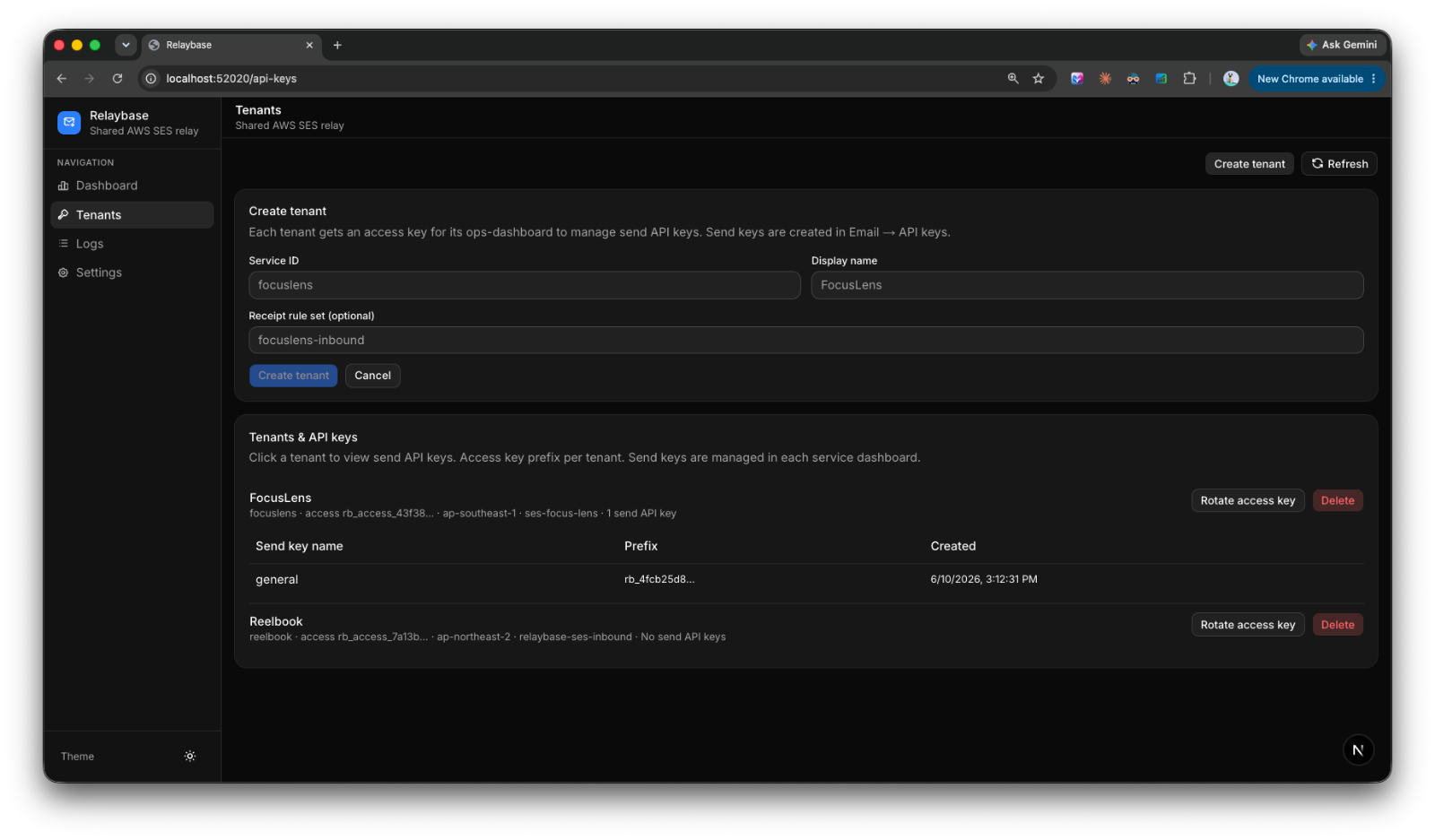
Each tenant gets:
- A send API key (
rb_...) for SES operations — send, inbox, domains, identities, production access - An access key (
rb_access_...) for managing send keys via/api/keys
Typical flow:
- Operator creates a tenant and hands you an access key
- You paste that into your service dashboard (Email → Relaybase settings)
- From there you create send keys, verify a domain, optionally wire up inbound S3
- Your app calls
POST /api/sendwith a send key — done
No AWS SDK in your product code. No console archaeology when something breaks.
curl -X POST https://relay.example.com/api/send \
  -H "Authorization: Bearer rb_..." \
  -H "Content-Type: application/json" \
  -d '{
    "from": "hello@example.com",
    "to": "user@example.com",
    "subject": "Welcome",
    "text": "Thanks for signing up."
  }'
Inbound works the same way: SES receipt rules drop mail into S3, Relaybase exposes GET /api/inbox and GET /api/inbox/:key with parsed headers and bodies. Sandbox exit, identity verification, domain DKIM — all HTTP endpoints with JSON responses and readable errors.
Why I started building it
Google Workspace wasn't the only dead end. Transactional email SaaS is priced for volume or teams. SES is cheap to send, but expensive in time — especially when you're running several products solo. Focus Lens, PureMac, Sayso, this site. Each one needed its own addresses, and each time I was re-solving the same SES setup.
The pain wasn't sending a single test email. It was the operational surface:
- Verifying a new domain and waiting on DNS
- Tracking sandbox vs production access per account
- Rotating keys without breaking a live app
- Reading inbound support mail without opening Gmail or the AWS console
I wanted one relay I control, with a stable API my apps and dashboards can share. Not per-seat inbox pricing. Not copy-pasting IAM snippets into every repo.
Relaybase is that layer — SES underneath, HTTP on top, multi-tenant by design.
The ops dashboard problem
A few weeks ago I wrote about managing multiple products from one internal dashboard. Sayso App Store builds, release metadata, the glue work nobody demos but everyone feels.
Email landed in that dashboard too. Domain setup, API keys, inbox, SES account status — all wired per service (Focus Lens, MacPurity, …).
It worked. But it was the wrong shape.
Email panels are heavy. They pull in AWS concepts, Relaybase credentials, verification state, inbound buckets. App Store panels pull in TestFlight and ASC. Website panels pull in Cloudflare. None of that is really "email" — it's per-service infrastructure.
Keeping email embedded meant the dashboard was secretly an email admin tool that also happened to deploy Sayso builds. Every new product meant cloning another email settings stack instead of adding a manifest entry and the panels that product actually needs.
Detaching email to make the dashboard general
So I split the architecture:
Relaybase — standalone email relay + its own admin panel (tenants, logs, AWS defaults, access key rotation). Provisions tenants; each tenant gets an access key you paste into a service's ops UI.
Ops dashboard — a general service dashboard. Services are discovered from manifest.yaml files. Each service declares which panels it needs: overview, release, app-store, website, email, support, and so on. Sayso gets App Store and TestFlight. Focus Lens gets release, website, and email. Relaybase itself gets an infra panel for operator work.
Email in a product dashboard doesn't talk to AWS. It talks to your Relaybase tenant via that access key. Send keys are created in Email → API keys; the relay handles SES on the other side.
That separation matters:
- Relaybase stays focused — one job, one API, one place to monitor sends and logs
- The ops dashboard stays general — add a service, enable panels, plug in credentials. No email code leaking into unrelated features
- Products stay thin —
POST /api/sendwith a key, not SES SDK wiring in every app
What's next
Relaybase is running for my own products now. The ops dashboard is where I manage everything else — releases, stores, websites — with email as just another panel type backed by the relay.
If you're a solo builder running multiple services, the pattern I keep coming back to is: extract the shared infrastructure, keep the dashboard generic. Email was the first piece worth pulling out. It won't be the last.
#buildinpublic
Infrastructure posts aren't flashy. But getting email and ops out of the way is what makes shipping the actual product feel possible again. I'll keep wiring things in as the stack grows.